Its been quiet on the TouchPad front for me over the past several days.
HP's announcement that webOS is going open source was no big surprise... It was one of the common options/scenarios that had been floating around since Meg Whitman reversed course on Leo Apotheker's decision to scrap the PC unit and kill the TouchPad.
Otherwise, nothing worth sharing has happened with my TouchPad.
On another front, though...
I've spent some time getting a now-ancient Sony 8mm TRV350 camcorder (vintage 2003) working with my Windows 7 laptop and digitizing/editing some tapes recorded twenty years ago on an earlier 8mm camcorder..
The problem was that my current laptop -- the camcorder can connect to a computer by either Fire Wire, USB, or composite connections -- doesn't have a Fire Wire port, nor composite video connections, and Windows 7 does not natively support USB video streaming.
The solution was buying an EzCap116 USB video capture device on Amazon.
The device installs a driver on the computer that allows Windows 7 to support USB video streaming. The camcorder then connects to the device via composite RCA-Type connectors and the device connects to the computer via USB.
The video is captured as an mpeg2 in an ArcSoft program (TotalMedia ShowBiz 3.5) bundled with the capture device.
I import the video into Windows Live Movie Maker to do my edits and output the final file in .wmv.
Its a decent solution, at a modest expense ($30), to extend the useful life of the camcorder and do something with a boxful of tapes that are deteriorating more with each passing day.
This post was written on my TouchPad
Follow me on Twitter... @rnolan1087

Showing posts with label Amazon. Show all posts
Showing posts with label Amazon. Show all posts
Monday, December 12, 2011


Wednesday, December 7, 2011
My TouchPad Today: Kindle Library Books - Not Ready for Prime Time?
Since an announcement from Amazon earlier this year I had eagerly been awaiting the debut of borrowing Kindle library books.
A few weeks ago I heard that the program had begun and went about getting myself in on the action

It wasn't extremely difficult, but it certainly wasn't a breeze either.
Here -- more or less -- is a recap of my experience...
- Learned on Overdrive.com that I would need a valid library card and would be borrowing through the regional library network of which my town is a member
- Discovered that my local library card had expired, but couldn't be renewed online
- Visited the library and told the librarian that I wanted to renew/reactivate my card so that I could borrow Kindle books.
- Asked for my current phone number by the librarian as she reactivated my card and updated my "account"
- Discovered, online back at home, that my regional library network needs my local library card/account to have an email address added to it
- Sent email to the local library asking them to add my email address to my card/account
- Found the following afternoon that I was able to register for electronic borrowing with my regional library network, although my local library never confirmed/acknowledged that my email address was added to my account
- Perused the slim offerings available from my regional library network on Overdrive.com... most of what's available is already out on loan or has one or more borrowers on a wait list
- Put myself on a wait list for Piecework by Pete Hamill
Fast forward to last week...
- Received email advising that my requested Kindle book was now available
- Followed link to my regional library network
- Sent to Amazon for the download part of the checkout process
My Current Recommendation/Bottom Line...
- Great concept that will become useful with some refinement of the Overdrive.com /regional library network/local library parts of the picture
- Selection of books will hopefully improve in the future. Though for now, a number of publishers are dragging their feet on making electronic library copies available
- There's no need to hurry in getting onboard with Kindle borrowing, unless you have the constitution to deal with a system/program that is not quite ready for prime time
This post was written on my TouchPad
Follow me on Twitter... @rnolan1087
A few weeks ago I heard that the program had begun and went about getting myself in on the action

It wasn't extremely difficult, but it certainly wasn't a breeze either.
Here -- more or less -- is a recap of my experience...
- Learned on Overdrive.com that I would need a valid library card and would be borrowing through the regional library network of which my town is a member
- Discovered that my local library card had expired, but couldn't be renewed online
- Visited the library and told the librarian that I wanted to renew/reactivate my card so that I could borrow Kindle books.
- Asked for my current phone number by the librarian as she reactivated my card and updated my "account"
- Discovered, online back at home, that my regional library network needs my local library card/account to have an email address added to it
- Sent email to the local library asking them to add my email address to my card/account
- Found the following afternoon that I was able to register for electronic borrowing with my regional library network, although my local library never confirmed/acknowledged that my email address was added to my account
- Perused the slim offerings available from my regional library network on Overdrive.com... most of what's available is already out on loan or has one or more borrowers on a wait list
- Put myself on a wait list for Piecework by Pete Hamill
Fast forward to last week...
- Received email advising that my requested Kindle book was now available
- Followed link to my regional library network
- Sent to Amazon for the download part of the checkout process
My Current Recommendation/Bottom Line...
- Great concept that will become useful with some refinement of the Overdrive.com /regional library network/local library parts of the picture
- Selection of books will hopefully improve in the future. Though for now, a number of publishers are dragging their feet on making electronic library copies available
- There's no need to hurry in getting onboard with Kindle borrowing, unless you have the constitution to deal with a system/program that is not quite ready for prime time
This post was written on my TouchPad
Follow me on Twitter... @rnolan1087
Friday, September 30, 2011
My TouchPad Today: Bezos & Hastings - The Dirty Duo of Internet Business
Yes, my friends, Jeff Bezos of Amazon and Reed Hastings of Netflix/Quickster/Whatever are the Dirty Duo of Internet business.
Hastings has been on my "bad" list for a long time. His recent pricing and company split shenanigans were only real-life confirmation of what my built-in BS detector told me when I first saw him on Charlie Rose's program several years ago. (I suspect that in real life he sets off BS detectors at a distance of five miles!)
On the other hand, I've been a Bezos admirer until recently... namely yesterday when Bezos/Amazon announced their new Kindles, and finally decided to make good on the HP firesale pricing of the TouchPad for all purchasers. Ya coulda knocked me over with a feather!
Its painfully obvious what both of these business gurus did will, in the long run, be beneficial to their customers, employees and shareholders, but its equally clear that its a lousy way to treat your customers and employees in the here and now.
Hastings and Netflix did the right thing by spinning off the DVD-by-mail business, but failed miserably at managing their customers through the changes... hence the uproar at Greed Hastings's arrogance. And I'm sure that its been much more painful for Netflix's employees than if a proper change management plan -- or any plan -- had been used with their customers.
Bezos/Amazon's TP price rebate decision was a great move business-wise because it put cash into tablet customer's hands on the same day that it announced the modestly priced Kindle Fire and the other new Kindle models. Brilliant... but by holding out for a month, your customer-facing employees took an undeserved beating on your behalf. Your customers and their money were held hostage for pure, naked greed on your part.
Somehow, Jeff, your proclamation yesterday about the type of company you and Amazon have chosen to be set off BS detectors around the world.
Mr. Bezos, have you met your new roomie Mr. Hastings?
Which of you is taking the top bunk?
Follow me on Twitter... @rnolan1087,
Hastings has been on my "bad" list for a long time. His recent pricing and company split shenanigans were only real-life confirmation of what my built-in BS detector told me when I first saw him on Charlie Rose's program several years ago. (I suspect that in real life he sets off BS detectors at a distance of five miles!)
On the other hand, I've been a Bezos admirer until recently... namely yesterday when Bezos/Amazon announced their new Kindles, and finally decided to make good on the HP firesale pricing of the TouchPad for all purchasers. Ya coulda knocked me over with a feather!
Its painfully obvious what both of these business gurus did will, in the long run, be beneficial to their customers, employees and shareholders, but its equally clear that its a lousy way to treat your customers and employees in the here and now.
Hastings and Netflix did the right thing by spinning off the DVD-by-mail business, but failed miserably at managing their customers through the changes... hence the uproar at Greed Hastings's arrogance. And I'm sure that its been much more painful for Netflix's employees than if a proper change management plan -- or any plan -- had been used with their customers.
Bezos/Amazon's TP price rebate decision was a great move business-wise because it put cash into tablet customer's hands on the same day that it announced the modestly priced Kindle Fire and the other new Kindle models. Brilliant... but by holding out for a month, your customer-facing employees took an undeserved beating on your behalf. Your customers and their money were held hostage for pure, naked greed on your part.
Somehow, Jeff, your proclamation yesterday about the type of company you and Amazon have chosen to be set off BS detectors around the world.
Mr. Bezos, have you met your new roomie Mr. Hastings?
Which of you is taking the top bunk?
Follow me on Twitter... @rnolan1087,
Saturday, September 17, 2011
My TouchPad Today: CE Compass Leather Case - The Same, but Different?
Back in July I bought a CE Compass case for my TouchPad from Amazon and posted a couple of items about it...
This past week I bought the same case for my wife's TP and had a bit of a surprise -- albeit pleasant -- when it arrived yesterday... It's the same, but different!
Some of the differences apparent at first glance...
Overall, the darned thing just looks better now. The original version looked and felt as if it was a generic case that just happened to fit the TP. This new version actually looks like it was designed to fit the TouchPad.

Note: July version had hole punched near bottom right corner
Follow me on Twitter... @rnolan1087
- My TouchPad Today: OTA Update and Other Thoughts
- My TouchPad Today: Drift in CE Compass HP TouchPad Case (Video Mini-Review)
This past week I bought the same case for my wife's TP and had a bit of a surprise -- albeit pleasant -- when it arrived yesterday... It's the same, but different!
Some of the differences apparent at first glance...
- Better quality of materials
- Better cut and fit of case to the device
- Velcro strips added to secure flap that holds the device in the case (Reduces "drift" of device in the case, which was an issue with the prior version of the case.)
- Concealed magnetic closures for case cover restyled and moved away from the edges of the case
- Camera lens cutout (originally a circle) is now the same "swooping" open-sided type as used for the Home button
Overall, the darned thing just looks better now. The original version looked and felt as if it was a generic case that just happened to fit the TP. This new version actually looks like it was designed to fit the TouchPad.
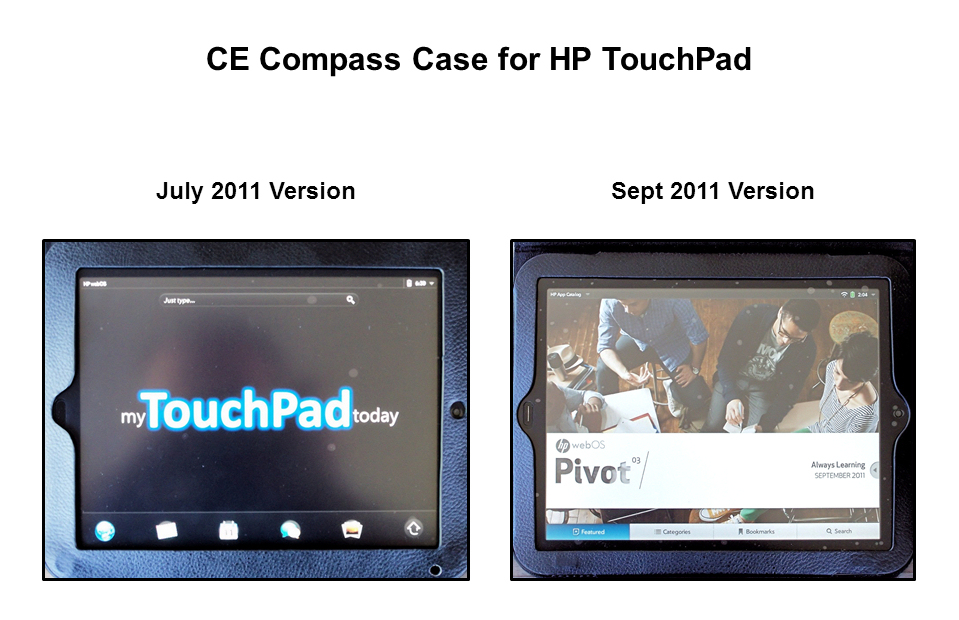
Note: July version had hole punched near bottom right corner
after purchase to allow more light to reach ambient sensor.
Follow me on Twitter... @rnolan1087
Wednesday, August 24, 2011
My TouchPad Today: Shame on Amazon...
Shame on Amazon and the other merchants/vendors who are not matching HP's weekend's liquidation price ($99 - 16GB / $149 - 32GB) for TouchPad customers who purchased their units prior to August 12.
I'm one of those early adopters who pre-ordered on June 20 and received it on July 8.
Amazon, through their various customer service channels (e-mail, online chat and telephone), has refused to make the adjustment/match to the HP's liquidation price. Their only offer is to return the TP for a full refund.
I can understand their position, up to a point, but what makes it particularly frustrating/aggravating is...
Follow me on Twitter... @rnolan1087
I'm one of those early adopters who pre-ordered on June 20 and received it on July 8.
Amazon, through their various customer service channels (e-mail, online chat and telephone), has refused to make the adjustment/match to the HP's liquidation price. Their only offer is to return the TP for a full refund.
I can understand their position, up to a point, but what makes it particularly frustrating/aggravating is...
- HP has asked their sellers to match the liquidation price for all purchasers
- Amazon, despite citing a policy of not matching the price for purchases before August 12, is giving a liquidation match to some customers who bought before August 12. They refuse to comment on those cases.
Follow me on Twitter... @rnolan1087
Sunday, August 21, 2011
My TouchPad Today: The Search for the Savage TouchPad
I managed to bag a couple of 16GB TouchPads today online at the liquidation price of $99.99 each...
The other will be kept in reserve, or I might dedicate it to Preware-type usage.
Follow me on Twitter... @rnolan1087
- Best Buy before 7:30 AM EDT
- Amazon.com, through a storefront called "onSale" around 6:00 PM EDT
The other will be kept in reserve, or I might dedicate it to Preware-type usage.
Follow me on Twitter... @rnolan1087
Saturday, August 13, 2011
My TouchPad Today: Acase Anti-Glare Screen Protectors (Video Mini-Review)
Received my Acase anti-glare screen protectors from Amazon a couple of days ago and have installed one on my HP TouchPad.
Mini-Review...
Video version on YouTube.
Mini-Review...
Video version on YouTube.
- Quality: Good. Reminds me of a combination of some anti-glare protectors I used on my Treo 700w and the Verizon protectors I used on my Pre+.
- Cost: $14.95 (3-pack), plus shipping.
- Ease of Installation: Moderate. A rookie at installing screen protectors might get a tad frustrated.
- Installation Tip: Do not install by aligning the protector to the screen by the cutout for the Home button. Instead, try to align it by the cutout for the camera... Better results, less effort.
- Overall Impression: Does a decent job of softening/diffusing glare and reflection from the TP screen. Softens screen image a bit, understandably, but totally acceptable. Left some bubbles, but they should work themselves out in a short period of time.
Thursday, August 11, 2011
My TouchPad Today: QVC "Made it Right". Who's Next?
Now that QVC has "made it right" by rebating $100+ to TouchPad early adopters, will any of the other large retailers step up and do the same thing for their customers?
Obviously, QVC and other retailers are under no obligation to make a rebate like this, but it does make some sense to do it on a couple of fronts.
It is...
Beyond those reasons, I'm just happy because it brings some additional public attention to HP's shabby handling of the the whole TouchPad affair over the past couple of months.
This certainly isn't a bad thing.
Kudos to QVC.
Hey, Jeff Bezos, will Amazon step up and also "make it right" for TouchPad early adopters?
Obviously, QVC and other retailers are under no obligation to make a rebate like this, but it does make some sense to do it on a couple of fronts.
It is...
- probably cheaper in the long run to be out in front of the purchasers who will be asking for rebates and/or making returns.
- a goodwill gesture which will pay dividends to them at a later date.
Beyond those reasons, I'm just happy because it brings some additional public attention to HP's shabby handling of the the whole TouchPad affair over the past couple of months.
This certainly isn't a bad thing.
Kudos to QVC.
Hey, Jeff Bezos, will Amazon step up and also "make it right" for TouchPad early adopters?
Saturday, August 6, 2011
My TouchPad Today: Poke the Box (Video Mini-Review)
A couple of days ago I read the Seth Godin book Poke the Box on my HP TouchPad, using theAmazon Kindle app.
"The Domino Project is a new way to think about publishing. Founded by Seth Godin and powered by Amazon, its trying to change the way books are built, sold and spread.
Format agnostic. Kindle, audiobook, paperback, collectible… all good."
See my mini-review of Poke the Box on YouTube.
"The Domino Project is a new way to think about publishing. Founded by Seth Godin and powered by Amazon, its trying to change the way books are built, sold and spread.
Format agnostic. Kindle, audiobook, paperback, collectible… all good."
See my mini-review of Poke the Box on YouTube.
Wednesday, August 3, 2011
My TouchPad Today: Drift in CE Compass HP TouchPad Case (Video Mini-Review)
In my post yesterday I mentioned that I had purchased a CE Compass case for my HP TouchPad and found -- somewhat understandably -- that the unit drifted around a bit in it.
It may not seem like a lot, but when reaching for a button, or when trying to make a quick adjustment, that drift is significant.
See my video mini-review about this drift on YouTube.
It may not seem like a lot, but when reaching for a button, or when trying to make a quick adjustment, that drift is significant.
See my video mini-review about this drift on YouTube.
Wednesday, July 20, 2011
Amazon Kindle App - Day 2
In the past 24 hours I've had a chance to dive a little deeper into the Amazon Kindle app on the HP TouchPad. Clearly no "wow" factor here... not that there actually needs to be one. Its just a reader ap combined with the ability to download and synch books purchased from Amazon.
Animated Page Turns
I get the idea that some people feel the need to have the visual metaphor of turning a page on an e-reader -- or they just think its "cool"-- but its a loser in the present incarnation... slow, clunky and cheap-looking.
'Nuf said!
Animated Page Turns
I get the idea that some people feel the need to have the visual metaphor of turning a page on an e-reader -- or they just think its "cool"-- but its a loser in the present incarnation... slow, clunky and cheap-looking.
'Nuf said!
Tuesday, July 19, 2011
First Impression: Kindle App
I saw early this morning on PreCentral that the Amazon Kindle app for the HP TouchPad had finally arrived. As is usually the case, the comments along with the postings were a mess of conflicting "stuff", rendering the post to -- perhaps what it should be -- a note saying "Its here. Go check it out for yourself".
I did a brief spin around the app. No "wow" factor here. Just an app that, if you are a Kindle user, is familiar and navigable enough when you take into account that the Kindle on any non-Kindle device ain't a Kindle. Don't get yourself bogged down in details like page turn animations or side-loading books.
Amazon has pretty much "got it right" with their Kindle devices.
Kindle apps for non-Kindle devices, such as this one for the TouchPad, are probably the best a reasonable person can expect. It does a reasonable job of making a book readable on a tablet device.
Last thought... If e-ink displays were at the point of being viable for a tablet like the TouchPad, then we'd have something to flap our gums about.
I did a brief spin around the app. No "wow" factor here. Just an app that, if you are a Kindle user, is familiar and navigable enough when you take into account that the Kindle on any non-Kindle device ain't a Kindle. Don't get yourself bogged down in details like page turn animations or side-loading books.
Amazon has pretty much "got it right" with their Kindle devices.
Kindle apps for non-Kindle devices, such as this one for the TouchPad, are probably the best a reasonable person can expect. It does a reasonable job of making a book readable on a tablet device.
Last thought... If e-ink displays were at the point of being viable for a tablet like the TouchPad, then we'd have something to flap our gums about.
Monday, July 18, 2011
Day In and Day Out...
Not the old song, but rather a brief post about how my TouchPad's battery is responding to daily use.
In a word... Fine. As I'm typing this, my battery is just a bit south of 65%, nearing 3:00 PM on a weekday.
Are there other tablets out there with better battery specs than the TouchPad?... Sure, but I'm not using one. The TouchPad is meeting my current needs, so the talk about which battery takes and holds a bigger charge is irrelevant to me at this time.
Hey, I've been using devices powered by rechargeable batteries for close to thirty years, and I've had a few "dogs" along the way. The TouchPad isn't a dog -- far from it. Its fine!
In a word... Fine. As I'm typing this, my battery is just a bit south of 65%, nearing 3:00 PM on a weekday.
Are there other tablets out there with better battery specs than the TouchPad?... Sure, but I'm not using one. The TouchPad is meeting my current needs, so the talk about which battery takes and holds a bigger charge is irrelevant to me at this time.
Hey, I've been using devices powered by rechargeable batteries for close to thirty years, and I've had a few "dogs" along the way. The TouchPad isn't a dog -- far from it. Its fine!
Saturday, July 9, 2011
Battery Life?
I haven't had the opportunity to fully run down the battery yet and get a feel for how long the TouchPad will actually run on a charge, but I can say that it seems to sip power more slowly than any device (other than an Amazon Kindle) I've ever owned.
Subscribe to:
Posts (Atom)