During my past couple of days of tinkering with (actually trudging along with) Spalshtop Remote HD for the TouchPad, I can truthfully report that Mr. Hare never made an appearance.
This puppy -- er, tortoise -- will never be confused with anything related to speed.
It lives in the same neighborhood as families named Sluggish and Finicky.
All of that being said, the slowness probably isn't actually Splashtop's fault. This is, after all, a remote desktop app, subject to the whims of the Internet connection gods.
And is the finickiness related to the same gods? I'm thinkin' "yes".
So what's the problem here?
Me thinks that it goes directly to the concept of remotely controlling a mouse-based device with a multi-touch device... You can do it, but how much can you actually do, and how much can you actually do well... and what's the cost in terms of time and effort expended?
Sure, you can stream video or audio. Sure you can read/surf with it, but the experience starts to break down and become an exercise in frustration when you need to scroll vertically in a window. Too much effort for too little in return.
A deeper breakdown of the experience reveals itself when you attempt to create some content in an application like PowerPoint. Yes, it can be done, but, once again, at what cost?
So, getting back to the fabled Tortoise and the Hare...
Splashtop Remote or any other similar app is almost guaranteed to be the Tortoise.
The real questions are how much do you really need remote access via your TouchPad and what type of work do you need to accomplish?
Assuming that your need is more in the direction of accessing content, rather than creating content, Splashtop Remote HD is a good purchase for your TouchPad. Otherwise, consider yourself warned!
Follow me on TouchPad... @rnolan1087

Showing posts with label tablet. Show all posts
Showing posts with label tablet. Show all posts
Thursday, September 29, 2011


Wednesday, September 28, 2011
My TouchPad Today: The Tablet Won't Kill the PC - The PC Lives On and On and...
Tablets like the TouchPad are obviously here to stay, but will they kill the PC and make it disappear from our lives?
Nope! Its probably gonna be with us for longer than any of the so-called visionaries can imagine. (Though tablets will get much better in the long run at creating content... one of the PC's fortes.)
Sure, IBM saw some kind of handwriting on the wall several years ago and dumped their PC business on Lenovo. Sure, HP, in its current stupor, is mulling dumping their PC group. But this kind of thought and vision is taking place kinda way up in the business stratosphere.
So what's happening in the dens, basements and garages of the world? People are clinging to the PC in its many iterations of the past 20+ years. The PC lives on and on and on...
How do I know?
First off, I'm generally "progressive" with technology, but I do find myself nursing along a 2003 vintage mini-tower PC -- holding my data going back to 1993 -- that has been upgraded from XP to Vista to Win 7. Its final retirement has been deferred countless times. Plus, along with my HP TP, Win7 laptop, and Pre2 smartphone, I'm holding on to a fleet of PDA's, laptops, and netbooks (and related software) in various stages of semi-retirement, ready to jump back into the game at a moment's notice.
Secondly, and more importantly, last week I had an experience that brought me back to earth vis a vis the actual penetration of newer technology into those dens, basements, and garages I mentioned earlier. A friend told me that her husband had a computer that refused to boot. I naturally offered to assist in reviving the beast. What I found was a bit of a shocker...
The fella uses three PC's in his business and they range from one that is vintage 2000+ to two that are 1995-ish. The older ones actually date back to when he started to computerize his work in the mid-90's... which was the last time I chatted with him!
Why hasn't he done more updating along the way? There are probably a bunch of reasons, but the main one is that the older PC's support older equipment he still uses in his business today and has no need to update at this point in his life.
Now, just imagine how many times this type of scenario is repeated across the country and around the world!
The PC lives on and on and on...
Follow me on Twitter... @rnolan1087
Nope! Its probably gonna be with us for longer than any of the so-called visionaries can imagine. (Though tablets will get much better in the long run at creating content... one of the PC's fortes.)
Sure, IBM saw some kind of handwriting on the wall several years ago and dumped their PC business on Lenovo. Sure, HP, in its current stupor, is mulling dumping their PC group. But this kind of thought and vision is taking place kinda way up in the business stratosphere.
So what's happening in the dens, basements and garages of the world? People are clinging to the PC in its many iterations of the past 20+ years. The PC lives on and on and on...
How do I know?
First off, I'm generally "progressive" with technology, but I do find myself nursing along a 2003 vintage mini-tower PC -- holding my data going back to 1993 -- that has been upgraded from XP to Vista to Win 7. Its final retirement has been deferred countless times. Plus, along with my HP TP, Win7 laptop, and Pre2 smartphone, I'm holding on to a fleet of PDA's, laptops, and netbooks (and related software) in various stages of semi-retirement, ready to jump back into the game at a moment's notice.
Secondly, and more importantly, last week I had an experience that brought me back to earth vis a vis the actual penetration of newer technology into those dens, basements, and garages I mentioned earlier. A friend told me that her husband had a computer that refused to boot. I naturally offered to assist in reviving the beast. What I found was a bit of a shocker...
The fella uses three PC's in his business and they range from one that is vintage 2000+ to two that are 1995-ish. The older ones actually date back to when he started to computerize his work in the mid-90's... which was the last time I chatted with him!
Why hasn't he done more updating along the way? There are probably a bunch of reasons, but the main one is that the older PC's support older equipment he still uses in his business today and has no need to update at this point in his life.
Now, just imagine how many times this type of scenario is repeated across the country and around the world!
The PC lives on and on and on...
Follow me on Twitter... @rnolan1087
Saturday, September 17, 2011
My TouchPad Today: CE Compass Leather Case - The Same, but Different?
Back in July I bought a CE Compass case for my TouchPad from Amazon and posted a couple of items about it...
This past week I bought the same case for my wife's TP and had a bit of a surprise -- albeit pleasant -- when it arrived yesterday... It's the same, but different!
Some of the differences apparent at first glance...
Overall, the darned thing just looks better now. The original version looked and felt as if it was a generic case that just happened to fit the TP. This new version actually looks like it was designed to fit the TouchPad.

Note: July version had hole punched near bottom right corner
Follow me on Twitter... @rnolan1087
- My TouchPad Today: OTA Update and Other Thoughts
- My TouchPad Today: Drift in CE Compass HP TouchPad Case (Video Mini-Review)
This past week I bought the same case for my wife's TP and had a bit of a surprise -- albeit pleasant -- when it arrived yesterday... It's the same, but different!
Some of the differences apparent at first glance...
- Better quality of materials
- Better cut and fit of case to the device
- Velcro strips added to secure flap that holds the device in the case (Reduces "drift" of device in the case, which was an issue with the prior version of the case.)
- Concealed magnetic closures for case cover restyled and moved away from the edges of the case
- Camera lens cutout (originally a circle) is now the same "swooping" open-sided type as used for the Home button
Overall, the darned thing just looks better now. The original version looked and felt as if it was a generic case that just happened to fit the TP. This new version actually looks like it was designed to fit the TouchPad.
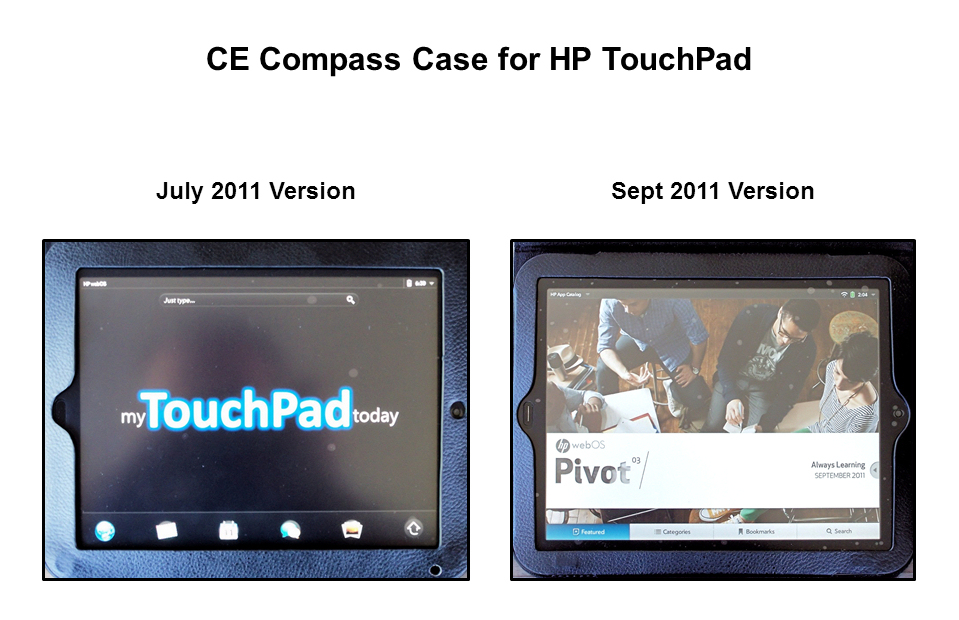
Note: July version had hole punched near bottom right corner
after purchase to allow more light to reach ambient sensor.
Follow me on Twitter... @rnolan1087
Thursday, September 1, 2011
My TouchPad Today: TouchPad Battery Life
For me, the battery life of my TouchPad continues to be one of the nice little plusses of tablet computing. Gone is the constant battery indicator watching of the laptop world.
Thus far, when working unplugged, I haven't had the need to plug in at any point in a given day to get more juice to keep going.
My guesstimate is that I'm using in the vicinity of 15% of my battery power per hour, unplugged and continuously on wifi.
I can live with that quite nicely!
How about you? Enter a comment below.
Follow me on Twitter... @rnolan1087
Thus far, when working unplugged, I haven't had the need to plug in at any point in a given day to get more juice to keep going.
My guesstimate is that I'm using in the vicinity of 15% of my battery power per hour, unplugged and continuously on wifi.
I can live with that quite nicely!
How about you? Enter a comment below.
Follow me on Twitter... @rnolan1087
Tuesday, August 16, 2011
My TouchPad Today: 7" TP - Will the Price be Right?
As we get closer to the debut of the 7" TouchPad, I've started to wonder how the heck is HP going to handle this one?
I mean, the shabby handling of the 10" TP pricing affair (and less-than-stellar software configuration for the multi-day July 1 and July 17 launch) is not really in the rearview mirror yet.
The price -- assuming HP stays with a config similar to the ten-incher... one camera, no HDMI out, etc. -- has to come in south of the current $399 for the 16GB TP. Nobody will touch it if they pull the July pricing nonsense -- start out absurdly high, then come back closer to reality, when under fire -- again.
Now, Acer is out there in recent days with a seven-incher that has two cameras and HDMI-out for around $329. Is this the neighborhood where HP has to play?
I think the answer is "yes", but on the south side of that figure.
Bottom line... I think that HP has plenty of rope here to hang themselves. The question is will they repeat their all-too-recent TP blunders or will they spare us all of the angst this time around?
Follow me on Twitter... @rnolan1087
I mean, the shabby handling of the 10" TP pricing affair (and less-than-stellar software configuration for the multi-day July 1 and July 17 launch) is not really in the rearview mirror yet.
The price -- assuming HP stays with a config similar to the ten-incher... one camera, no HDMI out, etc. -- has to come in south of the current $399 for the 16GB TP. Nobody will touch it if they pull the July pricing nonsense -- start out absurdly high, then come back closer to reality, when under fire -- again.
Now, Acer is out there in recent days with a seven-incher that has two cameras and HDMI-out for around $329. Is this the neighborhood where HP has to play?
I think the answer is "yes", but on the south side of that figure.
Bottom line... I think that HP has plenty of rope here to hang themselves. The question is will they repeat their all-too-recent TP blunders or will they spare us all of the angst this time around?
Follow me on Twitter... @rnolan1087
My TouchPad Today: Ambient Light Sensor - The Final Solution
In the end, it has taken a combination of four things to get the ambient light sensor on my HP TouchPad working correctly again...
All of this efforts brings to mind Click & Clack's motto... "The stingy man pays the most".
But, hey, I got a few blog posts out of it. That ain't a bad thing, is it?
Follow me on Twitter... @rmolan1087
- Punching a hole in the CE Compass leather case I'm using, near an embedded magnet that covers the sensor.
- Improvising and installing two rubber "bumpers" to lift the leather ridge/flap of the case that covers the sensor.
- Punching a hole in the Acase View anti-glare screen protector I'm using on the TP. The protector came from the factory with cutouts for the camera and Home button, but does not have one for the light sensor.
- Learning and remembering to keep my right hand away from the area near the sensor. The cutouts of the CE Compass leather case (for the camera and the Home button) orient the TP so that the On/Off button, Volume button and ambient light sensor are at the bottom right when used in the landscape mode... Exactly where I naturally want to place my right hand when using the TP.
All of this efforts brings to mind Click & Clack's motto... "The stingy man pays the most".
But, hey, I got a few blog posts out of it. That ain't a bad thing, is it?
Follow me on Twitter... @rmolan1087
Thursday, August 11, 2011
My TouchPad Today: Price Reduction - Sweet and Sour?
I have mixed feelings about the $100 price reduction HP announced yesterday for both TP models.
Sweet -- For my money (pun intended), folks buying the TP at the new HP price -- plus any additional discounts from retailers -- are getting a decent deal. This is the pricing that should have been in effect since the July 1/July 17 launch. The TP, in its current state of development, isn't worth the premium HP was originally charging.
Sour -- The life of an early adopter is not an easy -- or inexpensive -- one. We know that and accept it, but HP threw a couple of curveballs (maybe spitballs) at us on this one. First, they didn't deliver the unit they promised back in the February at the "Think Beyond" event. Second, they pulled the launch date shenanigans (oops, July 1 was really only a soft launch). Third, the OTA update foot-dragging. Last, a $50 software credit that is unlikely to be worth $50 to many users. This has not been a sweet -- or fair deal -- for TP early adopters.
Sweet -- For my money (pun intended), folks buying the TP at the new HP price -- plus any additional discounts from retailers -- are getting a decent deal. This is the pricing that should have been in effect since the July 1/July 17 launch. The TP, in its current state of development, isn't worth the premium HP was originally charging.
Sour -- The life of an early adopter is not an easy -- or inexpensive -- one. We know that and accept it, but HP threw a couple of curveballs (maybe spitballs) at us on this one. First, they didn't deliver the unit they promised back in the February at the "Think Beyond" event. Second, they pulled the launch date shenanigans (oops, July 1 was really only a soft launch). Third, the OTA update foot-dragging. Last, a $50 software credit that is unlikely to be worth $50 to many users. This has not been a sweet -- or fair deal -- for TP early adopters.
Wednesday, August 10, 2011
My TouchPad Today: Three Quick Thoughts
Three quick thoughts today about my HP TouchPad...
Battery Life -- Satisfied thus far with the battery life on my TP. I haven't had a day yet where I've run it down to less than a 45% charge remaining.
CE Compass Leather Case -- Case covers the TP's ambient light sensor, causing the display screen to dim. A possible remedy I'm thinking over is to punch a hole in the lip/ridge that covers the sensor.
Screen Protector -- Still awaiting delivery of my anti-glare protector from Amazon. Glare and reflection from the screen are becoming a major distraction and impediment to my work on the TP.
Battery Life -- Satisfied thus far with the battery life on my TP. I haven't had a day yet where I've run it down to less than a 45% charge remaining.
CE Compass Leather Case -- Case covers the TP's ambient light sensor, causing the display screen to dim. A possible remedy I'm thinking over is to punch a hole in the lip/ridge that covers the sensor.
Screen Protector -- Still awaiting delivery of my anti-glare protector from Amazon. Glare and reflection from the screen are becoming a major distraction and impediment to my work on the TP.
Saturday, August 6, 2011
My TouchPad Today: Disadvantages of Tablet Computing
Following up here with the flip side of yesterday's post about the advantages of tablet computing, through the eyes of someone who uses a HP TouchPad...
Are there disadvantages to Tablet Computing? Well, disadvantages might be a strong a word -- downsides might be more apt -- but it would be a lie to say that everything was peaches and cream when working with a tablet.
Glare and Reflection -- For my money at this point, I don't care what angle you are able to place your tablet at, unless you have a totally black ceiling overhead and a black wall behind you, it is virtually impossible to avoid dealing with large amount of glare and reflection. (One qualification on this. I haven't used an anti-glare screen protector on my TouchPad yet. One is on the way from Amazon, so more on this at a later date.)
No Mouse (Sometimes ya just need a mouse) -- With the current configuration of the TP, trying to do copy and paste operations are a big-time exercise in futility. Perhaps a restatement of this disadvantage would be to say that copy and paste on the TP need major re-work.
Lightweight Web Browser -- Many web pages that I access do not render well on the TP's built-in app called "Web". Additionally, if you are heavily tied to Microsoft's cloud storage offerings, you're presently out of luck if you want to access and use them on the TP.
Document Editing -- Connecting back a bit to my comment about the browser/browsing disadvantage, you can't edit Microsoft documents and spreadsheets whether on the web or loaded manually to the present TP. You might say, "Well, what about Google Docs?". I say, "No Go". For me, working with Google Docs is an exercise in futility that rivals trying to do copy/paste operations on the TP.
Do you see a bit of a pattern emerging here?
Three of the four tablet computing disadvantages mentioned are about what either the TP can't do, or does badly. TouchPads should have left the factory without these flaws, or at worst, should have been promptly updated to eliminate them.
Gee, thanks, Messrs. Ruby, DeWitt and Bradley. God, awfully good work! (Or is it... "Good God, awful work!"?)
Are there disadvantages to Tablet Computing? Well, disadvantages might be a strong a word -- downsides might be more apt -- but it would be a lie to say that everything was peaches and cream when working with a tablet.
Glare and Reflection -- For my money at this point, I don't care what angle you are able to place your tablet at, unless you have a totally black ceiling overhead and a black wall behind you, it is virtually impossible to avoid dealing with large amount of glare and reflection. (One qualification on this. I haven't used an anti-glare screen protector on my TouchPad yet. One is on the way from Amazon, so more on this at a later date.)
No Mouse (Sometimes ya just need a mouse) -- With the current configuration of the TP, trying to do copy and paste operations are a big-time exercise in futility. Perhaps a restatement of this disadvantage would be to say that copy and paste on the TP need major re-work.
Lightweight Web Browser -- Many web pages that I access do not render well on the TP's built-in app called "Web". Additionally, if you are heavily tied to Microsoft's cloud storage offerings, you're presently out of luck if you want to access and use them on the TP.
Document Editing -- Connecting back a bit to my comment about the browser/browsing disadvantage, you can't edit Microsoft documents and spreadsheets whether on the web or loaded manually to the present TP. You might say, "Well, what about Google Docs?". I say, "No Go". For me, working with Google Docs is an exercise in futility that rivals trying to do copy/paste operations on the TP.
Do you see a bit of a pattern emerging here?
Three of the four tablet computing disadvantages mentioned are about what either the TP can't do, or does badly. TouchPads should have left the factory without these flaws, or at worst, should have been promptly updated to eliminate them.
Gee, thanks, Messrs. Ruby, DeWitt and Bradley. God, awfully good work! (Or is it... "Good God, awful work!"?)
Friday, August 5, 2011
My TouchPad Today: One Month into the TouchPad Adventure
Now that I'm into my second month of tablet computing (actually third month if I count my June fling with an Android tablet while waiting for the TP to arrive), there are a few advantages I see overall as compared to using the desktops, laptops, and netbooks I own.
Tablet Computing Advantages
Maybe these aren't terribly dramatic-sounding, but think about what these three small items translate into....
Nothing to sneeze at, eh?
So, now that we have noted some advantages of tablet computing, you do know what will be coming down the pike shortly, don't you?... The (unspeakable for some out there) disadvantages of tablet computing.
Stay tuned...
Tablet Computing Advantages
- Instant start-up
- Battery life
- Better portability
Maybe these aren't terribly dramatic-sounding, but think about what these three small items translate into....
- Minutes saved with each boot (...compared to Win XP and Win 7)
- More freedom from the chains of electrical outlets and power brick
- A lighter briefcase, or, heaven forbid, no briefcase at all
Nothing to sneeze at, eh?
So, now that we have noted some advantages of tablet computing, you do know what will be coming down the pike shortly, don't you?... The (unspeakable for some out there) disadvantages of tablet computing.
Stay tuned...
Sunday, July 31, 2011
My HP TouchPad Received an Update Today!...
My HP TouchPad received an update today...

... Did it without any help from Ruby, DeWitt and Bradley!

... Did it without any help from Ruby, DeWitt and Bradley!
Friday, July 29, 2011
Follow-Up: New York Times News Feeds
A few days ago I did a post about the new New York Times News Feeds app for the HP TouchPad and was in the mode of not immediately abandoning the old New York Times beta app that carried over from my Pre smartphones. The new app certainly provides a richer, graphical presentation, but the news is the news.
Well, as it turns out, keeping around the old app has some real merit... at least for now. With it you have the ability to save stories for future reference, as well as the ability to text and email stories with a couple of simple clicks.
It appears to be a different story with the NYT News Feeds app. Registration is required to email stories, leading me to think taking this step will bring us into the world of paying for NYT content. I love reading the NYT online, but I don't love it $15 per month worth.
Meanwhile, back at the old NYT beta app... I was surprised last winter when the NYT went to a paid online subscription model and the beta reader on webOS survived as a freebie.
I was thinking they weren't worried enough about the small audience accessing their content this way to go to the bother of shutting us off.
As time has gone by, however, I'm not sure what's up, but I still have the free ride and the ability to readily save/text/email stories.
I think I'm staying on board the beta app train to the end of the line.
Well, as it turns out, keeping around the old app has some real merit... at least for now. With it you have the ability to save stories for future reference, as well as the ability to text and email stories with a couple of simple clicks.
It appears to be a different story with the NYT News Feeds app. Registration is required to email stories, leading me to think taking this step will bring us into the world of paying for NYT content. I love reading the NYT online, but I don't love it $15 per month worth.
Meanwhile, back at the old NYT beta app... I was surprised last winter when the NYT went to a paid online subscription model and the beta reader on webOS survived as a freebie.
I was thinking they weren't worried enough about the small audience accessing their content this way to go to the bother of shutting us off.
As time has gone by, however, I'm not sure what's up, but I still have the free ride and the ability to readily save/text/email stories.
I think I'm staying on board the beta app train to the end of the line.
Sunday, July 24, 2011
TouchPad OTA Update: MIA or Just SOL?
Now that we're at July 24, deep into the "shortly after" of the HP TouchPad's July 17 official launch and approaching the "by the end of the month" promise from HP, who wants take some action on the proposition that the OTA update will be MIA and we'll be SOL again?
I hate to be cynical and negative-sounding, but after a few decades in the business world, one develops a nose for the "horse hockey" -- borrowing a phrase from Col. Potter of M*A*S*H -- you hear from the Ruby-esque corporate types.
HP's soft launch/hard launch and shortly after/by the end of the month tapdances are the corporate equivalents of "the dog ate my homework". They're not ready. They don't know when they'll be ready... and are just trying to buy themselves some time to cook up the next tapdance.
So, what does this mean to those of us bought the TouchPad for what turned out to be the "on double-secret probation" July 1 soft launch and the "this time its for real, trust us" July 17 hard launch?...
I can faintly hear the Jackie Gleason/Ralph Kramden "Hummada hummada hummada" now from the direction of Palo Alto.
... Or is it, "August 15... Yeah... That's the ticket!" from Jon Lovtiz's liar character?
--------------------
Cynicism is an unpleasant way of saying the truth. -- Lillian Hellman
Bad taste is simply saying the truth before it should be said. -- Mel Brooks
I hate to be cynical and negative-sounding, but after a few decades in the business world, one develops a nose for the "horse hockey" -- borrowing a phrase from Col. Potter of M*A*S*H -- you hear from the Ruby-esque corporate types.
HP's soft launch/hard launch and shortly after/by the end of the month tapdances are the corporate equivalents of "the dog ate my homework". They're not ready. They don't know when they'll be ready... and are just trying to buy themselves some time to cook up the next tapdance.
So, what does this mean to those of us bought the TouchPad for what turned out to be the "on double-secret probation" July 1 soft launch and the "this time its for real, trust us" July 17 hard launch?...
I can faintly hear the Jackie Gleason/Ralph Kramden "Hummada hummada hummada" now from the direction of Palo Alto.
... Or is it, "August 15... Yeah... That's the ticket!" from Jon Lovtiz's liar character?
--------------------
Cynicism is an unpleasant way of saying the truth. -- Lillian Hellman
Bad taste is simply saying the truth before it should be said. -- Mel Brooks
Thursday, July 21, 2011
The Aha! - Saving (Moving) E-Mail Messages...
I've had a bit of an aha moment in the past day regarding the ability to save/move e-mail messages on the HP TouchPad tablet.
Yesterday, I was grousing that it took more steps to save an e-mail message (move it to a folder). While that still appears to be true for saving an individual message -- as compared to saving a message on a Pre smartphone -- it doesn't hold water for saving multiple messages on the Touchpad. There's a bit of an improvement baked into the TouchPad.
On a Pre, messages must be saved/moved one by one. On the TouchPad, the new mail interface allows multiple messages to be selected and then saved to a designated folder... certainly not a bad thing.
Now that I've weasled my way around saying outright that I was wrong... I have to run. I have a mailbox to cleanup.
Yesterday, I was grousing that it took more steps to save an e-mail message (move it to a folder). While that still appears to be true for saving an individual message -- as compared to saving a message on a Pre smartphone -- it doesn't hold water for saving multiple messages on the Touchpad. There's a bit of an improvement baked into the TouchPad.
On a Pre, messages must be saved/moved one by one. On the TouchPad, the new mail interface allows multiple messages to be selected and then saved to a designated folder... certainly not a bad thing.
Now that I've weasled my way around saying outright that I was wrong... I have to run. I have a mailbox to cleanup.
Wednesday, July 20, 2011
Amazon Kindle App - Day 2
In the past 24 hours I've had a chance to dive a little deeper into the Amazon Kindle app on the HP TouchPad. Clearly no "wow" factor here... not that there actually needs to be one. Its just a reader ap combined with the ability to download and synch books purchased from Amazon.
Animated Page Turns
I get the idea that some people feel the need to have the visual metaphor of turning a page on an e-reader -- or they just think its "cool"-- but its a loser in the present incarnation... slow, clunky and cheap-looking.
'Nuf said!
Animated Page Turns
I get the idea that some people feel the need to have the visual metaphor of turning a page on an e-reader -- or they just think its "cool"-- but its a loser in the present incarnation... slow, clunky and cheap-looking.
'Nuf said!
Saving (Moving) E-Mail Messages
Is it just me, or is the process for saving messages (move to a folder) a lot clunkier on the HP TouchPad than on the HP and Palm Pre WebOS smartphones?
On the Pre, its just a matter of choosing "move to folder" from a dropdown menu and then selecting the desired folder. Fairly straightforward and to the point.
For the TouchPad, more steps are required to do the same thing, clearly a drag on personal productivity.
Am I missing something obvious here or has HP gummed up something that was simple in the world before WebOS3?
On the Pre, its just a matter of choosing "move to folder" from a dropdown menu and then selecting the desired folder. Fairly straightforward and to the point.
For the TouchPad, more steps are required to do the same thing, clearly a drag on personal productivity.
Am I missing something obvious here or has HP gummed up something that was simple in the world before WebOS3?
Monday, July 18, 2011
Day In and Day Out...
Not the old song, but rather a brief post about how my TouchPad's battery is responding to daily use.
In a word... Fine. As I'm typing this, my battery is just a bit south of 65%, nearing 3:00 PM on a weekday.
Are there other tablets out there with better battery specs than the TouchPad?... Sure, but I'm not using one. The TouchPad is meeting my current needs, so the talk about which battery takes and holds a bigger charge is irrelevant to me at this time.
Hey, I've been using devices powered by rechargeable batteries for close to thirty years, and I've had a few "dogs" along the way. The TouchPad isn't a dog -- far from it. Its fine!
In a word... Fine. As I'm typing this, my battery is just a bit south of 65%, nearing 3:00 PM on a weekday.
Are there other tablets out there with better battery specs than the TouchPad?... Sure, but I'm not using one. The TouchPad is meeting my current needs, so the talk about which battery takes and holds a bigger charge is irrelevant to me at this time.
Hey, I've been using devices powered by rechargeable batteries for close to thirty years, and I've had a few "dogs" along the way. The TouchPad isn't a dog -- far from it. Its fine!
Saturday, July 16, 2011
TouchPad: A Crimefighting Tool?
I read somewhere on the Internet today that law enforcement authorities have classified the new HP TouchPad as a crimefighting tool... because it captures the fingerprints of any who touches it.
Friday, July 15, 2011
No Wailing or Gnashing of Teeth
Several weeks ago, while briefing my wife about the upcoming purchase of an HP TouchPad, it dawned on me that the two laptops we have -- both less than one year old -- are probably the last laptops we'll own. (Our last laptops, which were almost exclusively used in the home, lasted around 7 years. The desktop PC was sent to the bullpen about four years ago and laid off for good before New Year's Eve 2011.)
I might be the last guy on this side of the Mississippi to have that realization, but the introduction and adoption of the current style of tablets, not withstanding the arrogant stampede of the Apple iPad and the launch of the semi-crippled HP TouchPad, has been a remarkably uneventful affair. No wailing or gnashing of teeth within my earshot.
... Although I do think I'm hearing a faint whimper coming from the Targus 16" padded bag over in the corner.
I might be the last guy on this side of the Mississippi to have that realization, but the introduction and adoption of the current style of tablets, not withstanding the arrogant stampede of the Apple iPad and the launch of the semi-crippled HP TouchPad, has been a remarkably uneventful affair. No wailing or gnashing of teeth within my earshot.
... Although I do think I'm hearing a faint whimper coming from the Targus 16" padded bag over in the corner.
Subscribe to:
Posts (Atom)