Tablets like the TouchPad are obviously here to stay, but will they kill the PC and make it disappear from our lives?
Nope! Its probably gonna be with us for longer than any of the so-called visionaries can imagine. (Though tablets will get much better in the long run at creating content... one of the PC's fortes.)
Sure, IBM saw some kind of handwriting on the wall several years ago and dumped their PC business on Lenovo. Sure, HP, in its current stupor, is mulling dumping their PC group. But this kind of thought and vision is taking place kinda way up in the business stratosphere.
So what's happening in the dens, basements and garages of the world? People are clinging to the PC in its many iterations of the past 20+ years. The PC lives on and on and on...
How do I know?
First off, I'm generally "progressive" with technology, but I do find myself nursing along a 2003 vintage mini-tower PC -- holding my data going back to 1993 -- that has been upgraded from XP to Vista to Win 7. Its final retirement has been deferred countless times. Plus, along with my HP TP, Win7 laptop, and Pre2 smartphone, I'm holding on to a fleet of PDA's, laptops, and netbooks (and related software) in various stages of semi-retirement, ready to jump back into the game at a moment's notice.
Secondly, and more importantly, last week I had an experience that brought me back to earth vis a vis the actual penetration of newer technology into those dens, basements, and garages I mentioned earlier. A friend told me that her husband had a computer that refused to boot. I naturally offered to assist in reviving the beast. What I found was a bit of a shocker...
The fella uses three PC's in his business and they range from one that is vintage 2000+ to two that are 1995-ish. The older ones actually date back to when he started to computerize his work in the mid-90's... which was the last time I chatted with him!
Why hasn't he done more updating along the way? There are probably a bunch of reasons, but the main one is that the older PC's support older equipment he still uses in his business today and has no need to update at this point in his life.
Now, just imagine how many times this type of scenario is repeated across the country and around the world!
The PC lives on and on and on...
Follow me on Twitter... @rnolan1087

Showing posts with label Touch Pad. Show all posts
Showing posts with label Touch Pad. Show all posts
Wednesday, September 28, 2011


Tuesday, September 20, 2011
My TouchPad Today: Mornings with the TouchPad and the Pre2
Nothing spectacularly new happening in my TouchPad world over the past few days, so I'll go here with something about my morning routine with my TouchPad and Pre2.
Everyday my electronic duo of the TouchPad and Pre2 get a bit of a morning workout. Here's the agenda...
Follow me on Twitter... @rnolan1087
Everyday my electronic duo of the TouchPad and Pre2 get a bit of a morning workout. Here's the agenda...
- PreCentral.net
- The Charlotte Observer
- Boston.com / The Boston Globe
- The New York Times
- Tea Reader (for my Google Reader feeds)
- Blogger.com (to check on my blogs... My TouchPad Today and The Friday Special)
Follow me on Twitter... @rnolan1087
Saturday, September 17, 2011
My TouchPad Today: CE Compass Leather Case - The Same, but Different?
Back in July I bought a CE Compass case for my TouchPad from Amazon and posted a couple of items about it...
This past week I bought the same case for my wife's TP and had a bit of a surprise -- albeit pleasant -- when it arrived yesterday... It's the same, but different!
Some of the differences apparent at first glance...
Overall, the darned thing just looks better now. The original version looked and felt as if it was a generic case that just happened to fit the TP. This new version actually looks like it was designed to fit the TouchPad.

Note: July version had hole punched near bottom right corner
Follow me on Twitter... @rnolan1087
- My TouchPad Today: OTA Update and Other Thoughts
- My TouchPad Today: Drift in CE Compass HP TouchPad Case (Video Mini-Review)
This past week I bought the same case for my wife's TP and had a bit of a surprise -- albeit pleasant -- when it arrived yesterday... It's the same, but different!
Some of the differences apparent at first glance...
- Better quality of materials
- Better cut and fit of case to the device
- Velcro strips added to secure flap that holds the device in the case (Reduces "drift" of device in the case, which was an issue with the prior version of the case.)
- Concealed magnetic closures for case cover restyled and moved away from the edges of the case
- Camera lens cutout (originally a circle) is now the same "swooping" open-sided type as used for the Home button
Overall, the darned thing just looks better now. The original version looked and felt as if it was a generic case that just happened to fit the TP. This new version actually looks like it was designed to fit the TouchPad.
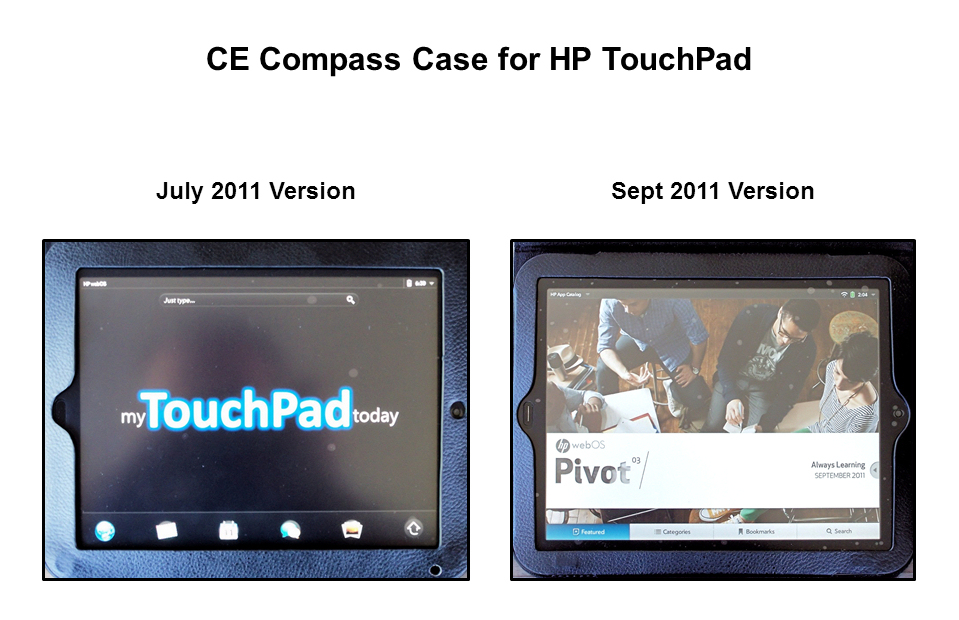
Note: July version had hole punched near bottom right corner
after purchase to allow more light to reach ambient sensor.
Follow me on Twitter... @rnolan1087
Friday, September 16, 2011
My TouchPad Today: Tea Reader - An All-Star Player!
Continuing the baseball-related theme from yesterday's post about Video Flood HD being a utility infielder...
Tea Reader is a definite All-Star on my team of TouchPad tablet apps!
With the Enyo-style three sliding panes of info, it has reinvigorated my interest -- and ability -- to follow my Google Reader news feeds.
Over time, it had become a real chore to scroll and slog through my subscription feeds in the Google Reader interface (Desktop = poor / Mobile = brutally bad ).
Tea Reader removes the scroll and slog with the ability to rapidly flick and view through the (sometimes lengthy) list of stories in each of my feeds. This comes in very, very handy when your feeds contain a number of overlapping and duplicate posts.
(For my money, Tea Reader is an even better Enyo fit and user experience than the HP's own built-in email app.)
Would it surprise you that Tea Reader is batting "clean-up" in my TouchPad lineup?
Follow me on Twitter... @rnolan1087
Tea Reader is a definite All-Star on my team of TouchPad tablet apps!
With the Enyo-style three sliding panes of info, it has reinvigorated my interest -- and ability -- to follow my Google Reader news feeds.
Over time, it had become a real chore to scroll and slog through my subscription feeds in the Google Reader interface (Desktop = poor / Mobile = brutally bad ).
Tea Reader removes the scroll and slog with the ability to rapidly flick and view through the (sometimes lengthy) list of stories in each of my feeds. This comes in very, very handy when your feeds contain a number of overlapping and duplicate posts.
(For my money, Tea Reader is an even better Enyo fit and user experience than the HP's own built-in email app.)
Would it surprise you that Tea Reader is batting "clean-up" in my TouchPad lineup?
Follow me on Twitter... @rnolan1087
Thursday, September 15, 2011
My TouchPad Today: Video Flood HD - A Utility Infielder?
Video Flood HD kinda reminds me of the utility infielder a baseball team will carry on its roster... Able to play multiple positions and fill a hole in a pinch, but not an everyday player. A utility player needed in the daily lineup for more than the short term, usually has his weaknesses and limitations exposed quickly.
Nevertheless, I love utility players. They're a valuable and important part of the game.
After several days of use, yes, I see Video Flood as a classic utility player. It certainly fills a hole in my roster of TouchPad tablet apps, but isn't strong enough to play every day, meaning it won't replace or unseat my other sources for the same types of video content.
It can play video clips from categories like News, Entertainment and Technology... But it largely replicates what I can access on my Roku HD box or Windows 7 Media Center on my laptop.
When it comes to TV shows and movies, its the same story. There isn't enough "there" to make it an every day player.
Obviously, its biggest virtue is that it is a tablet app... That's what gets it on my roster and will keep it on my roster until that better player come along.
(Note: I have not yet tried the podcast and YouTube features of Video Flood.)
Batter up?
Follow me on Twitter... @rnolan1087
Nevertheless, I love utility players. They're a valuable and important part of the game.
After several days of use, yes, I see Video Flood as a classic utility player. It certainly fills a hole in my roster of TouchPad tablet apps, but isn't strong enough to play every day, meaning it won't replace or unseat my other sources for the same types of video content.
It can play video clips from categories like News, Entertainment and Technology... But it largely replicates what I can access on my Roku HD box or Windows 7 Media Center on my laptop.
When it comes to TV shows and movies, its the same story. There isn't enough "there" to make it an every day player.
Obviously, its biggest virtue is that it is a tablet app... That's what gets it on my roster and will keep it on my roster until that better player come along.
(Note: I have not yet tried the podcast and YouTube features of Video Flood.)
Batter up?
Follow me on Twitter... @rnolan1087
Thursday, September 8, 2011
My TouchPad Today: TouchPad Battery on Standby - Update
In a post last week I mentioned that the battery in my wife's little-used firewall TP was draining about 20 - 25% per day when turned off and not plugged into a Touchstone or conventional USB charger.
Well, this week the battery is showing almost no loss when kept at idle and off a charger... A pleasant development.
(I wonder if the battery has stabilized itself after experiencing more charging cycles?)
Follow me on Twitter... @rnolan1087
Well, this week the battery is showing almost no loss when kept at idle and off a charger... A pleasant development.
(I wonder if the battery has stabilized itself after experiencing more charging cycles?)
Follow me on Twitter... @rnolan1087
Sunday, September 4, 2011
My TouchPad Today: A Bookmark Trap - The Future is Now
A month ago I posted an item A Bookmark Trap?... noting that the new item "Clear Bookmarks" on the webOS browser preferences list was an accident waiting to happen. This item precedes the familiar items Clear History/Ciookies/Cache that have been in previous versions of webOS.
Well, the future is now and the accident has happened!
A couple of days ago I was having lunch in a restaurant with free WiFi and something was wrong with the connection. After a bit of fruitless troubleshooting, I decided to switch over to the mobile hotspot on my Pre2.
As it turned out, trying to connect to the phone was also fruitless... and the TouchPad was nearly unresponsive.
I managed to open preferences in the browser and intended to clear my history, cookies and cache to see if this basic troubleshooting move might get things back on the right footing.
Alas, it was not to be... My first automatic/reflexive swipe at the preferences list blew away my list of browser bookmarks.
Gee, thanks, HP! I couldn't have done it without ya!
Follow me on Twitter... @rnolan1087
Well, the future is now and the accident has happened!
A couple of days ago I was having lunch in a restaurant with free WiFi and something was wrong with the connection. After a bit of fruitless troubleshooting, I decided to switch over to the mobile hotspot on my Pre2.
As it turned out, trying to connect to the phone was also fruitless... and the TouchPad was nearly unresponsive.
I managed to open preferences in the browser and intended to clear my history, cookies and cache to see if this basic troubleshooting move might get things back on the right footing.
Alas, it was not to be... My first automatic/reflexive swipe at the preferences list blew away my list of browser bookmarks.
Gee, thanks, HP! I couldn't have done it without ya!
Follow me on Twitter... @rnolan1087
Friday, September 2, 2011
My TouchPad Today: TouchPad Battery on Standby
My wife isn't really using her TouchPad yet, so I'm having to keep a bit of an eye on it...
Seems like the TouchPad drains about 20 - 25% of its battery power per day when turned off and not plugged into a Touchstone or conventional USB charger.
(Just a casual observation over several days this week.)
Follow me on Twitter... @rnolan1087
Seems like the TouchPad drains about 20 - 25% of its battery power per day when turned off and not plugged into a Touchstone or conventional USB charger.
(Just a casual observation over several days this week.)
Follow me on Twitter... @rnolan1087
Thursday, September 1, 2011
My TouchPad Today: TouchPad Battery Life
For me, the battery life of my TouchPad continues to be one of the nice little plusses of tablet computing. Gone is the constant battery indicator watching of the laptop world.
Thus far, when working unplugged, I haven't had the need to plug in at any point in a given day to get more juice to keep going.
My guesstimate is that I'm using in the vicinity of 15% of my battery power per hour, unplugged and continuously on wifi.
I can live with that quite nicely!
How about you? Enter a comment below.
Follow me on Twitter... @rnolan1087
Thus far, when working unplugged, I haven't had the need to plug in at any point in a given day to get more juice to keep going.
My guesstimate is that I'm using in the vicinity of 15% of my battery power per hour, unplugged and continuously on wifi.
I can live with that quite nicely!
How about you? Enter a comment below.
Follow me on Twitter... @rnolan1087
Tuesday, August 30, 2011
My TouchPad Today: Preware on My TouchPad
Over the weekend I finally dipped my toe into the world of Preware on my TouchPad.
I installed the following patches/applications...
First impressions..
Follow me on Twitter... @rnolan1087
I installed the following patches/applications...
- Increase Touch Sensitivity and Smoothness 10
- Muffle System Logging
- Remove Dropped Packet Logging
- Unthrottle Download Manager
- Increase TouchPad Volume (Lite)
First impressions..
- No adverse effects seen on my TP thus far
- TP seems "stabler"
- My TP does not seem "faster" now, as compared to my wife's TP which does not have Preware installed.
Follow me on Twitter... @rnolan1087
Saturday, August 27, 2011
My TouchPad Today: HP - Fire, Ready, Aim?
The New York Times reviews HP's uncanny ability in recent times to shoot itself in the foot...
For Seamless Transitions, Don't Look to Hewlett
Follow me on Twitter... @rnolan1087
For Seamless Transitions, Don't Look to Hewlett
Follow me on Twitter... @rnolan1087
Friday, August 26, 2011
My TouchPad Today: The Firesale TouchPad
The firesale TouchPad I ordered on Sunday morning from Best Buy arrived yesterday.
Between last night and this morning, I set it up for my wife by downloading the webOS OTA update and adding some apps from the HP catalog...
I also went into the phone app and minimized logging as per James Kendrick's recent ZDNet Mobile News blog post about how to speed up the TouchPad.
The only difficulty I ran into was that it took NUMEROUS attempts to download and install the OTA update, DigiCamera and Audubon Birds. HP's servers must be swamped with all of the download requests from the firesale brigade of new users.
Follow me on Twitter... @rnolan@1087
Between last night and this morning, I set it up for my wife by downloading the webOS OTA update and adding some apps from the HP catalog...
- Gemini File Manager
- DigiCamera Lite
- Audubon Birds
I also went into the phone app and minimized logging as per James Kendrick's recent ZDNet Mobile News blog post about how to speed up the TouchPad.
The only difficulty I ran into was that it took NUMEROUS attempts to download and install the OTA update, DigiCamera and Audubon Birds. HP's servers must be swamped with all of the download requests from the firesale brigade of new users.
Follow me on Twitter... @rnolan@1087
Tuesday, August 23, 2011
My TouchPad Today: TouchPad Sound - Tommy, Can You Hear Me?
Last night, I finally had the opportunity to download HP Play on my PC and sync some music to my TouchPad. Then, for a bit last night and this morning for a period while doing laundry, I listened to some of my favorite tunes of decades past, as well as some newer stuff.
I listened in a several ways... with earbuds, with closed-ear headphones and just via the built-in Beats speakers
First impression...
The sound is good, but something seems to be "missing". Though I kept pushing the volume all the way up to max or one notch just below, it wasn't volume that seemed to be missing.
After pondering it for awhile, I think the sound from my TouchPad is missing some degree of presence or power.
Thinking back to my audiophile wannabe days, it seems something akin to listening to high-end speakers playing music coming out of an underpowered amplifier. The music is in the room with you (not "coming at you", because of the good speakers), but it doesn't have enough power behind it to keep you from reaching for the volume control in a futile attempt to make up for it.
I wonder... Is this something that can be boosted/fixed by a software update, or is it something we'll have to live with on the TP?
Follow me on Twitter... @rnolan1087
I listened in a several ways... with earbuds, with closed-ear headphones and just via the built-in Beats speakers
First impression...
The sound is good, but something seems to be "missing". Though I kept pushing the volume all the way up to max or one notch just below, it wasn't volume that seemed to be missing.
After pondering it for awhile, I think the sound from my TouchPad is missing some degree of presence or power.
Thinking back to my audiophile wannabe days, it seems something akin to listening to high-end speakers playing music coming out of an underpowered amplifier. The music is in the room with you (not "coming at you", because of the good speakers), but it doesn't have enough power behind it to keep you from reaching for the volume control in a futile attempt to make up for it.
I wonder... Is this something that can be boosted/fixed by a software update, or is it something we'll have to live with on the TP?
Follow me on Twitter... @rnolan1087
Monday, August 22, 2011
My TouchPad Today: Speed it Up, Buddy! (Minimize Logging)
Caught a good post last night on ZDNet Mobile News (James Kendrick)...
How to improve the performance of your new HP TouchPad
Follow me on Twitter... @rnolan1087
How to improve the performance of your new HP TouchPad
Follow me on Twitter... @rnolan1087
Sunday, August 21, 2011
My TouchPad Today: The Search for the Savage TouchPad
I managed to bag a couple of 16GB TouchPads today online at the liquidation price of $99.99 each...
The other will be kept in reserve, or I might dedicate it to Preware-type usage.
Follow me on Twitter... @rnolan1087
- Best Buy before 7:30 AM EDT
- Amazon.com, through a storefront called "onSale" around 6:00 PM EDT
The other will be kept in reserve, or I might dedicate it to Preware-type usage.
Follow me on Twitter... @rnolan1087
Saturday, August 20, 2011
My TouchPad Today: My TP at Fenway Park
I'm heading to Fenway Park in Boston with my TouchPad for the annual Futures at Fenway minor league double header.
Pictures from my two TP camera apps later...
(The Red Sox are away on the road in Kansas City.)
--------------------------------------------------------------------------------
Up first, a picture taken with a Pre2 (with some minor fixing in Paint Shop Pro) of my TP at Fenway Park.


Follow me on Twitter... @rnolan1087
Pictures from my two TP camera apps later...
(The Red Sox are away on the road in Kansas City.)
--------------------------------------------------------------------------------
Up first, a picture taken with a Pre2 (with some minor fixing in Paint Shop Pro) of my TP at Fenway Park.

Up next, a series of pictures taken with the DigiCamera Lite app on my TP.
(Only some minor rotation/alignment fixes in Paint Shop Pro... No other post-processing used.)
Photo detail is decent for a 1.3 MP camera. Color, however, is lackluster/muted on what was a mostly sunny day with vibrant color.


Now, a final shot taken on the TP using the Camera app for the TouchPad.
This photo has the same lackluster/muted color as the shots taken with the DigiCamera Lite app. The TP camera and/or the app also had a some difficulty with handling the difference between the shade of the grandstand and the bright sun on the playing field.

Follow me on Twitter... @rnolan1087
Friday, August 19, 2011
My TouchPad Today: Et tu, Leo?
Just like everyone else, I heard the bad news from HP yesterday afternoon about the demise of the TouchPad, Pre and webOS, as we know them.
The demise was not unexpected because it was clear to anyone who wasn't an HP apologist that the Palm division (a/k/a The Good Ship Ruby) was just as adrift as it had been before being acquired by HP.
HP -- meaning Leo -- had no real interest in webOS or the devices.
Here's my take on what was going on...
Leo didn't buy Palm. He inherited it from the prior regime and had no personal attachment/stake in the devices or the OS.
He let the TP, etc. go forward, but let Ruby & Co. basically go their own way... with no supervision as to the final outcome.
As the TP launch approached, and it was "unfinished", Leo could have killed it then and took the loss, but decided differently.
His decision was to let it go... for the time being.
If the TP was even marginally successful, he would let things go for another period of time.
If it was not successful, he would put it to death in a measured/planned way.
What happened was that the TP and its launch was so bad in every way since July 1, that there was no choice, but the summary execution we witnessed yesterday.
Leo was done with it... No potential "upside" left for him, just more trouble caused by something which was not originally of his doing. (You'd probably do it, too.)
So, where does it leave us?
Pre, Veer and TP customers -- in plain English -- have been screwed over by Leo and Leo must go now. It won't change the decision to abandon webOS devices, but it is a small way to "make things right".
Now, you might be saying to yourself, "Hey, what about those clowns Ruby, DeWitt and Bradley? Shouldn't they be gone, too?" I agree, but Leo should be the first man to walk the plank. He had multiple opportunities to sink The Good Ship Ruby (or take control of it) long before the TP disaster hit the market... And did nothing.
Adios, Leo. That first step is a doozie.
Follow me on Twitter... @rnolan1087
The demise was not unexpected because it was clear to anyone who wasn't an HP apologist that the Palm division (a/k/a The Good Ship Ruby) was just as adrift as it had been before being acquired by HP.
HP -- meaning Leo -- had no real interest in webOS or the devices.
Here's my take on what was going on...
Leo didn't buy Palm. He inherited it from the prior regime and had no personal attachment/stake in the devices or the OS.
He let the TP, etc. go forward, but let Ruby & Co. basically go their own way... with no supervision as to the final outcome.
As the TP launch approached, and it was "unfinished", Leo could have killed it then and took the loss, but decided differently.
His decision was to let it go... for the time being.
If the TP was even marginally successful, he would let things go for another period of time.
If it was not successful, he would put it to death in a measured/planned way.
What happened was that the TP and its launch was so bad in every way since July 1, that there was no choice, but the summary execution we witnessed yesterday.
Leo was done with it... No potential "upside" left for him, just more trouble caused by something which was not originally of his doing. (You'd probably do it, too.)
So, where does it leave us?
Pre, Veer and TP customers -- in plain English -- have been screwed over by Leo and Leo must go now. It won't change the decision to abandon webOS devices, but it is a small way to "make things right".
Now, you might be saying to yourself, "Hey, what about those clowns Ruby, DeWitt and Bradley? Shouldn't they be gone, too?" I agree, but Leo should be the first man to walk the plank. He had multiple opportunities to sink The Good Ship Ruby (or take control of it) long before the TP disaster hit the market... And did nothing.
Adios, Leo. That first step is a doozie.
Follow me on Twitter... @rnolan1087
Thursday, August 18, 2011
My TouchPad Today: KalemSoft Media Player - Money for Nothing?
Great title for a post, but wholly inaccurate and misleading on a couple of counts...
As mentioned, it was a bumpy first experience with this app. I loaded a .WMV file on my TouchPad that i had recently made in Windows Live Movie Maker. It played back at four to five times slower than it does on a PC or on YouTube.
After some basic troubleshooting and pondering, it finally occurred to me that the problem could lie in the settings of the file itself, rather than the player having a problem.
That was the trick!... My original file was created using custom settings, including 59.9 fps. I went back to Movie Maker and created a new version of the file and chose the canned settings for making a file for playback on a "computer" (the frame rate setting is somewhere in vicinity of 24 - 29 fps). The new file worked like a charm.
Going forward, I'll have to be cognizant that this player/app may be more "plain vanilla" as compared to its bigger brothers in the PC world. As of now, this isn't a dealbreaker for me... I want the ability to play more video formats than which the TP can natively handle.
I haven' t tried the streaming capabilities of this app yet. If/when I check them out, I'll post something here.
Follow me on Twitter... @rnolan1087
- The KalemSoft Media Player app does work, but, in a bit, I'll relate my bumpy first experience with it.
- No money was directly involved in getting it from the HP app catalog... Used part of my $50 early adopter credit from HP.
As mentioned, it was a bumpy first experience with this app. I loaded a .WMV file on my TouchPad that i had recently made in Windows Live Movie Maker. It played back at four to five times slower than it does on a PC or on YouTube.
After some basic troubleshooting and pondering, it finally occurred to me that the problem could lie in the settings of the file itself, rather than the player having a problem.
That was the trick!... My original file was created using custom settings, including 59.9 fps. I went back to Movie Maker and created a new version of the file and chose the canned settings for making a file for playback on a "computer" (the frame rate setting is somewhere in vicinity of 24 - 29 fps). The new file worked like a charm.
Going forward, I'll have to be cognizant that this player/app may be more "plain vanilla" as compared to its bigger brothers in the PC world. As of now, this isn't a dealbreaker for me... I want the ability to play more video formats than which the TP can natively handle.
I haven' t tried the streaming capabilities of this app yet. If/when I check them out, I'll post something here.
Follow me on Twitter... @rnolan1087
Wednesday, August 17, 2011
My TouchPad Today: First Impression - A Tale of Two Cameras?
Today I had the opportunity to try out two camera apps I downloaded recently from the HP app catalog for my TouchPad...


Now, each picture cropped, but otherwise un-retouched, to make them as similar as possible...


Judge for yourself -- aside from my camerawork -- the quality of the camera/app combos.
For my part, not much to report yet, other than using a tablet computer front-facing camera for something other than a quick and dirty pic "in the field" when another type of camera isn't available, doesn't seem to be the wisest choice.
That's all for now... Hoping to test these apps a bit further over the upcoming weekend and post more after that.
Follow me on Twitter... @rnolan1087
- Camera for TouchPad -- Keen Studios, 0.3.0
- DigiCamera Lite -- DigiKat Software, 1.0.1


Now, each picture cropped, but otherwise un-retouched, to make them as similar as possible...


Judge for yourself -- aside from my camerawork -- the quality of the camera/app combos.
For my part, not much to report yet, other than using a tablet computer front-facing camera for something other than a quick and dirty pic "in the field" when another type of camera isn't available, doesn't seem to be the wisest choice.
That's all for now... Hoping to test these apps a bit further over the upcoming weekend and post more after that.
Follow me on Twitter... @rnolan1087
Tuesday, August 16, 2011
My TouchPad Today: 7" TP - Will the Price be Right?
As we get closer to the debut of the 7" TouchPad, I've started to wonder how the heck is HP going to handle this one?
I mean, the shabby handling of the 10" TP pricing affair (and less-than-stellar software configuration for the multi-day July 1 and July 17 launch) is not really in the rearview mirror yet.
The price -- assuming HP stays with a config similar to the ten-incher... one camera, no HDMI out, etc. -- has to come in south of the current $399 for the 16GB TP. Nobody will touch it if they pull the July pricing nonsense -- start out absurdly high, then come back closer to reality, when under fire -- again.
Now, Acer is out there in recent days with a seven-incher that has two cameras and HDMI-out for around $329. Is this the neighborhood where HP has to play?
I think the answer is "yes", but on the south side of that figure.
Bottom line... I think that HP has plenty of rope here to hang themselves. The question is will they repeat their all-too-recent TP blunders or will they spare us all of the angst this time around?
Follow me on Twitter... @rnolan1087
I mean, the shabby handling of the 10" TP pricing affair (and less-than-stellar software configuration for the multi-day July 1 and July 17 launch) is not really in the rearview mirror yet.
The price -- assuming HP stays with a config similar to the ten-incher... one camera, no HDMI out, etc. -- has to come in south of the current $399 for the 16GB TP. Nobody will touch it if they pull the July pricing nonsense -- start out absurdly high, then come back closer to reality, when under fire -- again.
Now, Acer is out there in recent days with a seven-incher that has two cameras and HDMI-out for around $329. Is this the neighborhood where HP has to play?
I think the answer is "yes", but on the south side of that figure.
Bottom line... I think that HP has plenty of rope here to hang themselves. The question is will they repeat their all-too-recent TP blunders or will they spare us all of the angst this time around?
Follow me on Twitter... @rnolan1087
Subscribe to:
Posts (Atom)