Saturday, September 17, 2011

My TouchPad Today: CE Compass Leather Case - The Same, but Different?

Back in July I bought a CE Compass case for my TouchPad from Amazon and posted a couple of items about it...
This past week I bought the same case for my wife's TP and had a bit of a surprise -- albeit pleasant -- when it arrived yesterday... It's the same, but different!

Some of the differences apparent at first glance...

  • Better quality of materials
  • Better cut and fit of case to the device
  • Velcro strips added to secure flap that holds the device in the case (Reduces "drift" of device in the case, which was an issue with the prior version of the case.)
  • Concealed magnetic closures for case cover restyled and moved away from the edges of the case
  • Camera lens cutout (originally a circle) is now the same "swooping" open-sided type as used for the Home button


Overall, the darned thing just looks better now. The original version looked and felt as if it was a generic case that just happened to fit the TP. This new version actually looks like it was designed to fit the TouchPad.
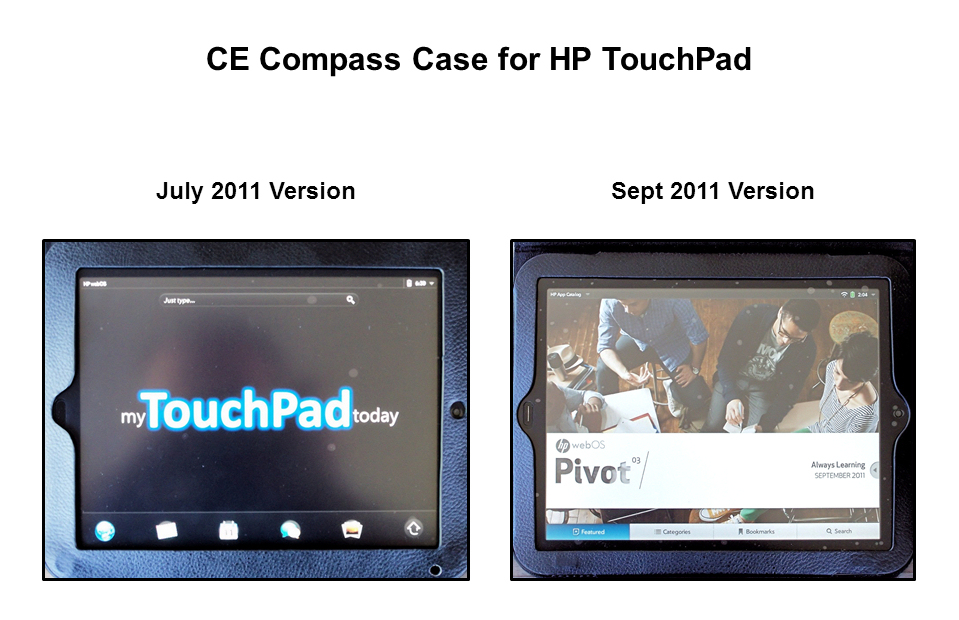

Note: July version had hole punched near bottom right corner
after purchase to allow more light to reach ambient sensor.


Follow me on Twitter... @rnolan1087

Friday, September 16, 2011

My TouchPad Today: Tea Reader - An All-Star Player!

Continuing the baseball-related theme from yesterday's post about Video Flood HD being a utility infielder...

Tea Reader is a definite All-Star on my team of TouchPad tablet apps!

With the Enyo-style three sliding panes of info, it has reinvigorated my interest -- and ability -- to follow my Google Reader news feeds.

Over time, it had become a real chore to scroll and slog through my subscription feeds in the Google Reader interface (Desktop = poor / Mobile = brutally bad ).

Tea Reader removes the scroll and slog with the ability to rapidly flick and view through the (sometimes lengthy) list of stories in each of my feeds. This comes in very, very handy when your feeds contain a number of overlapping and duplicate posts.

(For my money, Tea Reader is an even better Enyo fit and user experience than the HP's own built-in email app.)

Would it surprise you that Tea Reader is batting "clean-up" in my TouchPad lineup?


Follow me on Twitter... @rnolan1087

Thursday, September 15, 2011

My TouchPad Today: Video Flood HD - A Utility Infielder?

Video Flood HD kinda reminds me of the utility infielder a baseball team will carry on its roster... Able to play multiple positions and fill a hole in a pinch, but not an everyday player. A utility player needed in the daily lineup for more than the short term, usually has his weaknesses and limitations exposed quickly.

Nevertheless, I love utility players. They're a valuable and important part of the game.

After several days of use, yes, I see Video Flood as a classic utility player. It certainly fills a hole in my roster of TouchPad tablet apps, but isn't strong enough to play every day, meaning it won't replace or unseat my other sources for the same types of video content.

It can play video clips from categories like News, Entertainment and Technology... But it largely replicates what I can access on my Roku HD box or Windows 7 Media Center on my laptop.

When it comes to TV shows and movies, its the same story. There isn't enough "there" to make it an every day player.

Obviously, its biggest virtue is that it is a tablet app... That's what gets it on my roster and will keep it on my roster until that better player come along.

(Note: I have not yet tried the podcast and YouTube features of Video Flood.)

Batter up?


Follow me on Twitter... @rnolan1087

Wednesday, September 14, 2011

My TouchPad Today: Quickoffice HD - PreCentral Gets One Right

The boys over at PreCentral got one right in their "mixed" review of Quickoffice HD.

Check it out here.


Follow me on Twitter... @rnolan1087

Tuesday, September 13, 2011

My TouchPad Today: Exploring Some Apps

Over the last few days I've been busy with some things -- gasp -- not related to the HP TouchPad! Nevertheless I have snuck in a little app exploration...

My TouchPad

  • WiFi Media Synch - Now, a select set of files on my laptop are wirelessly synched to both my Pre2 and TP.
  • Video Flood - A lot of the content duplicates what is already available to me via my Windows 7 laptop and my Roku HD box... wirelessly! Video quality I've seen thus far is excellent.
  • PDFMyWebPro - Not a perfect app, but will be handy for me... when it works. (I've been using the full version of Adobe Acrobat on desktops and laptops for 10+ years.) This app fills an important gap in the tablet computing experience for me.
  • Gemini File Manager "Remote"- Don't know how much use this will get in my every day computing. I'm more likely to use box.net, et al, to access copies of files on my TP.

My Wife's TouchPad

I've now added a few more files to my wife's TP, in anticipation of the day when she actually starts to use it...

  • HP Play (downloaded to laptop and then used it to synch her music to her TP)
  • Video Flood 
  • Audiophile HD

Now, off to more exploration and -- gasp -- things not related to the TouchPad!


Follow me on Twitter... @rnolan1087

Thursday, September 8, 2011

My TouchPad Today: TouchPad Battery on Standby - Update

In a post last week I mentioned that the battery in my wife's little-used firewall TP was draining about 20 - 25% per day when turned off and not plugged into a Touchstone or conventional USB charger.

Well, this week the battery is showing almost no loss when kept at idle and off a charger... A pleasant development.

(I wonder if the battery has stabilized itself after experiencing more charging cycles?)


Follow me on Twitter... @rnolan1087

Wednesday, September 7, 2011

My TouchPad Today: Audiophile HD Pro - Make Me Pay More!

A couple of days ago I downloaded Audiophile HD Pro ($2.99) from the HP app catalog, using some of the credit remaining from the $50 promo code HP gave to the earliest TouchPad adopters.

First impression

There's a lot to like here...
  • 6-band equalizer
  • Crossfade
  • Adjustable bass and treble controls
The trouble I have here (and this is not a knock on the developer) is that I want more...
  • More control over the equalizer
  • More control over the base and treble ranges
And, oh, by the way... I'll pay, really pay, for an app that will give me something closer to what I can get with a PC-based audio program.


A confession... I've never fully "got" the concept of phone and tablet apps being priced at figures like $.99, $1.99, $2.99, etc.

Sure, I get the part about phones and tablets not being as robust as their PC brethren devices, therefore apps are "lightweight".

Sure, I get the parts about $.99 or so being a bargain for users and a nice little revenue stream for developers if a given app catches fire with the phone and tablet user masses.

But what about bringing to market higher quality, more polished apps that -- within the limits of phone and tablet hardware and OS's -- give the best possible user experience, rather than a lukewarm version of what's available on the big boys. I'll pay for it with my promo code or cold hard cash!


Two parting thoughts...
  • Build it, and they will come
  • Make me pay more!


Follow me on Twitter... @rnolan1087